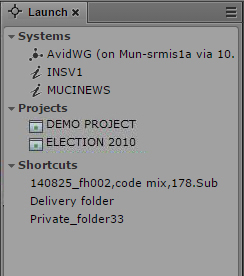
The Launch Pane
The Launch pane lists the iNEWS system, Interplay MAM system, and Interplay Production system that are available on the MediaCentral UX system. The Launch pane also includes any iNEWS projects and iNEWS servers that are part of an iNEWS community. It also includes any shortcuts you create. For information about creating shortcuts, see
Creating Shortcuts to Assets, Folders, and Queues.
Systems and projects are identified by the following icons.
Icon | Description |
| Connected Interplay Production system |
| Disconnected Interplay Production system |
| Connected Interplay MAM system |
| Connected iNEWS system |
| Disconnected iNEWS system |
| Project in the iNEWS database |
| iNEWS Project (not started) |
| iNEWS Project (expired) |
Opening a system, such as an iNEWS newsroom computer system, Interplay MAM system, or Interplay Production system, lets you view the contents of that system’s database in the Assets pane. Opening an iNEWS project from the Launch pane lets you view each project’s contents in the Assets pane.
To open a system or project from the Launch pane, do one of the following:

Double-click the item you want to open.
Right-click the item and select “Open in New Assets Tab.”
For more information about assets and projects, see
Working with Assets and
Working with Projects. For more information about iNEWS communities, see
Support for iNEWS Communities.
Related Topics