Showing and Hiding Empty Timing Blocks
If a story segment does not contain any text, and its corresponding timing block does not contain media, the timing is displayed as 0:00/0:00. Because the timing block does not contain media, it is considered empty, and by default it is not shown in the sequence. Empty timing blocks are also hidden by default in the following situations:
• All text in a story segment is marked as presenter instructions (red) or closed-captioning text (green).
• Text in a story segment is timed at one second or less.
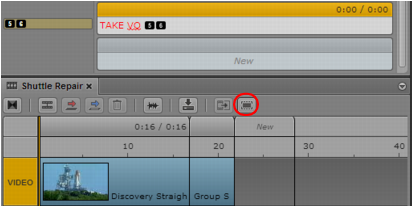
The following illustration shows a story segment without timed text (followed by a New segment). The corresponding timing block is hidden. The Show/Hide Empty Timing Blocks button is circled.
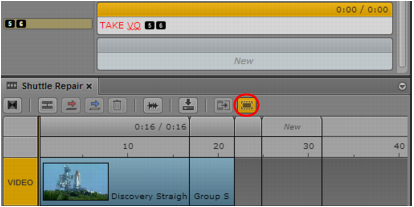
The following illustration shows the formerly hidden timing block. The Show/Hide Empty Timing Blocks button turns orange.
Note the following:
• If you extend a segment over a hidden timing block and into the next timing block, the hidden timing block is displayed and the segment is extended into it.
• If you take any actions to change a timing block, such as manually adjusting its duration, the block will always be shown.
To show timing blocks, do one of the following:

Click the Show/Hide Empty Timing Blocks button so that it is orange.
The tool tip for the button changes to Hide Empty Timing Blocks.
Select Show Empty Timing Blocks from the Pane menu.
To hide timing blocks, do one of the following:
Click the Show/Hide Empty Timing Blocks button so that it is gray.
The tool tip for the button changes to Show Empty Timing Blocks.
Select Hide Empty Timing Blocks from the Pane menu.
Related Topics