Enabling an Audio Track
When editing an advanced sequence, you can enable audio tracks in the following combinations:
• Video and NAT track
• Video and SOT track
• Video and NAT and SOT tracks
• VO track
Enabling an audio track provides options for the following operations:
See the appropriate procedure for more information.
To enable or disable an audio track:

In an advanced sequence, click the track indicator button.
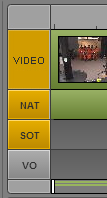
The track indicator is colored orange if enabled. The following illustration shows that the NAT and SOT tracks are enabled.
Note the following:
- Enabling the VO track disables NAT and SOT tracks.
- Enabling either the NAT or the SOT track disables the VO track
- If both the NAT and SOT tracks are enabled, Alt-click a track to disable both tracks.
- If both the NAT or SOT track are disabled, Alt-click a track to enable both tracks.