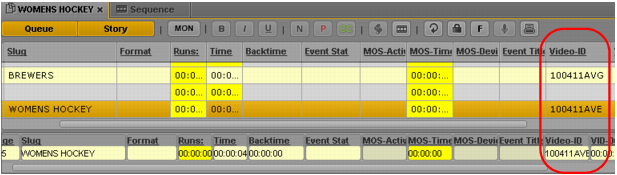
Associating a Video ID with a Script Sequence
If an iNEWS story contains a video ID, and you create a sequence that is associated with the story (referred to as a script sequence), the video ID is added to the metadata of the sequence. Starting with MediaCentral UX v2.6.1, the video ID is added to the metadata of a saved sequence even if the sequence does not contain any media. This is especially useful if the sequence is later edited in Media Composer.
You can view the video ID with other sequence metadata in the Metadata pane.
To create a script sequence with an associated video ID:
1. In the Queue/Story pane, create a new story or open an existing story that does not yet have a sequence associated with it.
2. Check if a video ID is listed. You can check the Video-ID column in the queue, or the Video-ID field in the Story Form.
If a video ID is not listed, click in either field and enter the appropriate video ID
3. Open the Sequence pane.
4. Click the Open Sequence button.
The name of the story is used for the name of the sequence.
5. (Optional) Edit the sequence.
6. Save the sequence.
The video ID is associated with the sequence and the sequence is checked into the Interplay Production database. The video ID is listed with other information about the sequence in the Metadata pane.
Related Topics
 For more information on associating sequences with iNEWS stories, see Associating a Sequence with a Story.