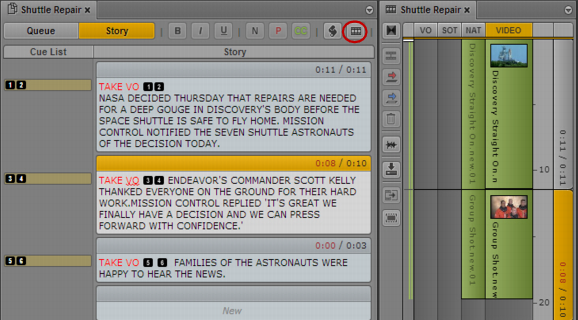
If you want to add media to your story, you need to create a video sequence that is associated with the story. To create a sequence, click the Open Sequence button in the Queue/Story pane toolbar. You also use this button to open a sequence that you have already associated with a story. You then can edit the sequence in the Sequence pane. For more information, see
Using the Sequence Pane and
Editing a Sequence Associated with a Story.
You can set an option to automatically load a sequence associated with a story. Select Home > User Settings > iNEWS > Autoload Sequence.
The following illustration shows the Open Sequence button and a sequence that is associated with a story.
 Saving a story does not save a sequence associated with a story. You must save the sequence in the Sequence pane. See Saving a Sequence.