The Script Editor
The section of the pane in which the story appears is called the Script Editor. There are three sub-sections of the Script Editor: Story Form, Cue List, and Story. The following illustration identifies these areas, along with where a story’s timing is displayed.
1 | Story Form | 3 | Story (text area) |
2 | Cue List | 4 | Timing display |
At the top of every story is the Story Form, which provides story information in fields that are predetermined by the iNEWS system administrator for each queue in the database. For example, a form can contain the story’s title (slug), page number, and status. Fields shown in the Story Form often also appear in the Queue section. Wire queues usually show different fields than rundown queues. You can edit fields in the Story Form, depending how they are configured by the iNEWS system administrator.
Avid iNEWS lets a system administrator assign colors to various components. These colors are now displayed in the following MediaCentral UX areas:
• Queue section: In earlier releases of MediaCentral UX, iNEWS system colors were shown in the Story Form. These colors are now also shown where applicable in the Queue section (rundown). If a story is selected in a rundown, any items that use iNEWS system colors display those same colors.
• Story Form drop-down menus: Any colors shown in Story Form drop-down menus on iNEWS are also shown in Story Form drop-down menus on MediaCentral UX.
You can use the horizontal dividing line between the Story Form and the rest of the sections to adjust the ratio of the Script Editor display within the pane. You can also choose to hide the Story Form while still viewing the other sub-sections of the Script Editor.
To hide the Story Form, do one of the following:

Click the Pane Menu button located at the top right corner of the Queue/Story pane and select Hide Story Form.
Right-click in the Story Form and select Hide Story Form.
To show the Story Form:
Click the Pane Menu button located at the top right corner of the Queue/Story pane and select Show Story Form.
The Story is the sub-section of the Script Editor in which you write your story or view the text of an existing story. As you type, your text automatically wraps to the next line when you reach the end of the current line. A scroll bar at the right side of this area appears when text extends beyond the bounds of the text area.
The timing displays located on the right side of the story’s segment headers show the duration of the text in each story segment. The duration of the text is based on the read rate that is set in Avid iNEWS. This number is useful if you create a sequence to accompany your story. See
Editing a Sequence Associated with a Story.
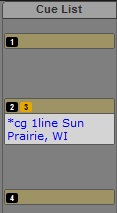
The Cue List is the sub-section of the Script Editor in which you edit production cues and machine control events, such as those for a character generator (CG). Each cue is numbered within a story, beginning with one (1). If cues are rearranged in the story, the system renumbers the cues automatically. The following illustration shows an example of a cue containing a CG event.