Understanding Users and Groups
Users and groups are the basic entities that you manage in MediaCentral UX. The following are concepts about users and groups that you should understand:
• MediaCentral User Management is a service that provides the ability to do the following:
- Create users and groups
- Manage users and groups
- Authenticate users across iNEWS and Interplay Production
- Manage which MediaCentral UX licenses a user has access to
MediaCentral User Management is one of the MediaCentral Services that runs on the MediaCentral Services server.
• A user is an entity that represents a real-world user. Users are authenticated through the MediaCentral User Management Service.
• A
group is an entity that represents a collection of users. For example, the group named Administrators is a collection of users that have administrator privileges. The Administrators group, the Administrator user, and the Auto Import group are created by default. For more information, see
Creating a New Group or Editing Group Details.
• A user is a member of a group. The group to which the user belongs is referred to as the
parent group. A new user is created as a member of the top-level group (Users) and can be assigned to one or more groups. For more information, see
Creating a New User or Editing User Details.
• A group can be a member of another group. The group to which the group belongs is referred to as the parent group.
• A user can be a member of more than one group, and a group can be a member of more than one group. Users and groups are considered members only of their immediate parent groups.
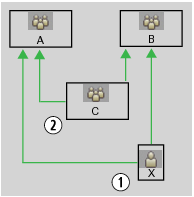
The following illustration shows the relationships that are allowed.
1 User X is a member of Groups A and B.
2 Group C is a member of Groups A and B.
A user or a group can be a member of more than one group in a single subtree. In the following illustration, user X can be a member of both group B and group C.
1 User X can be a member of both Group C and Group B.
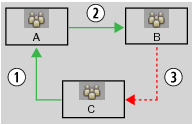
Relationships are hierarchical. Cyclical relationships, as in the following illustration, are not permitted.
1 Group C is a member of Group A.
2 Group A is a member of Group B.
3 Group B cannot be a member of Group C.
• If a user or a group is removed from all parent groups, the user or group is moved to the Unassigned group. For more information, see
Understanding the Unassigned Group.
• Users and groups have properties. Properties are defined fields that describe a user or a group. Only the values of properties can be changed. Examples of properties are group name, user first name and last name, and description.