Failover for Multiple MCDS Servers
You can configure your Interplay Production workgroup for multiple MediaCentral Distribution Service (MCDS) servers. Multiple MCDS servers provide a high-availability configuration and failover capability. For installation and configuration information, see the
MediaCentral Platform Services Installation and Configuration Guide and
Configuring System Settings.
The MediaCentral server, through the avid-central-service, keeps an ordered list of the available MCDS servers to be used for send to playback (STP). The active server is determined by the order in which it is listed in the Interplay Production settings (see
Configuring System Settings). Initially, the first server listed is the active server. Each time you send an STP job, the MediaCentral server checks if the currently active server is available. If not, the next available server in the list is made the active server. If none of the listed servers are available, the job will fail.
Example
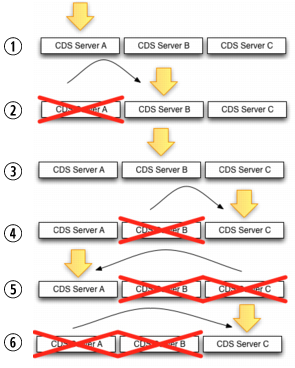
The following example shows servers MCDS Server A, MCDS Server B, and MCDS Server C configured for MCDS high availability.
1. Server A is listed first, so it is initially the active server. 2. Server A stops responding, so all new jobs go to Server B. 3. Server A comes back up, but jobs continue to go to Server B. 4. Server B stops responding, so all new jobs go to Server C. 5. Server C stops responding, so all new jobs go to Server A. 6. Server A stops responding, Server B is not responding, so all new jobs go to Server C | |
Configuration Changes
If you change the servers listed in the System Settings, and the currently active MCDS server is in the new list, the order in which availability is checked on failover begins with the currently active server, no matter where it is located on the list.
Example 1:
1. Servers A, B and C were initially configured for MCDS high availability.
2. Server B is the currently the active MCDS.
3. You reconfigure the settings list to use servers D, B and E.
a. Server B remains the active server (not D).
b. The sequence for testing on failover is B > E > D.
Example 2:
1. Servers A, B and C were initially configured for MCDS high availability.
2. Server B is the currently the active MCDS.
3. You reconfigure the settings list to use servers D, E, and F.
a. Server B will no longer be active because it is not on the list.
b. The sequence for testing on failover is now D> E > F.
Related Topics