Send-To-Playback Workflow: I-Frame Sequences
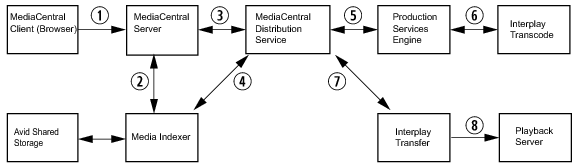
The following illustration shows a typical send-to-playback workflow for I-frame (non-Long GOP) sequences.
1. The user starts an STP process in MediaCentral UX.
2. The MediaCentral server, through the avid-central-service, checks media status through Media Indexer.
3. The avid-central-service creates an STP job and sends it to the MediaCentral Distribution Service (MCDS). MCDS performs an analysis of the sequence to determine if it needs an audio mixdown, a video mixdown, or both.
4. The MCDS uses Media Indexer to dynamically relink the sequence to media in the target resolution.
5. The MCDS sends a request for any required mixdowns to the Production Services Engine, which then sends the jobs to the Interplay Transcode provider.
6. Interplay Transcode performs the mixdowns and saves the media on the Avid shared-storage system.
7. MCDS initiates a transfer to the playback server, through Interplay Transfer.
8. Interplay Transfer transfers the sequence to the playback server.
Related Topics