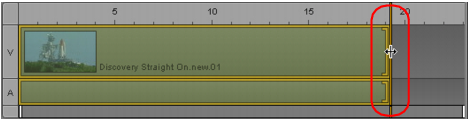
Trimming a Basic Sequence
When trimming a basic sequence, video and audio are trimmed together. You cannot trim only video or only audio.
To trim a segment using the mouse, do the following:

Click one end of the segment and drag the audio or video trim indicator.
To trim a segment using keyboard shortcuts:
1. Click the end of the segment you want to trim.
2. Press one of the following keys:
M | Trim the segment’s selected end by 10 frames earlier. |
comma (,) | Trim the segment’s selected end one frame earlier. |
period (.) | Trim the segment’s selected end one frame later. |
slash (/) | Trim the segment’s selected end 10 frames later.  This keyboard shortcut is designed for an American keyboard; it might not work with another keyboard layout. |
The position indicator automatically moves to the trim location.