Using Predefined Metadata
Media Index supports using metadata values that are predefined so that you can use consistent values in your searches. Typically, predefined terms are contained in a thesaurus or a legal list controlled by your asset management system. These values then display in the search criteria as a list of terms you can add to or exclude from your search.

You can use legal lists and thesaurus lists defined in your Interplay Media Asset Management (MAM) systems. For more information on MAM legal lists and thesauruses, see the Interplay | MAM Legal List Administrator User’s Guide and Interplay | MAM Thesaurus Administrator User’s Guide.
For example. you can use MAM asset types in your search queries. The schema with predefined or localized labels for assets types are configured in Interplay MAM. Once the Interplay MAM sync service sends the schema update to Media Index, the “Asset type” criterion allows you to select from a list of predefined asset types when searching MAM assets. The Asset type list provides localized labels for MAM asset types to aid in localized searches. For more information, see the Interplay | MAM Sync Service Administrator User’s Guide.
Thesaurus and legal list search criteria support the use of the following search prefixes:
• any (disables the thesaurus field)
• is (the default prefix)
• is not
• is set (disables the thesaurus field)
• not set (disables the thesaurus field)
Empty fields do not affect the search results.
To select pre-defined metadata for your indexed search:
1. Click the Pane Menu button and select Indexed Search.
2. In the Search pane, click the Add Criteria button and select a criterion that contains pre-defined terms.
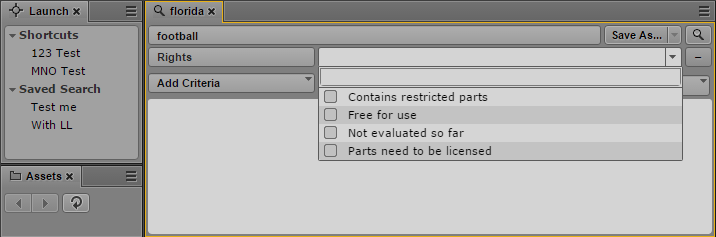
3. Click the menu for the list of terms for your criterion, and select one or more appropriate terms.
4. Enter your search terms and select any other criteria you want to use for your search.
5. Click the Search button.
The system returns assets that match the criteria in the search results list. If the asset exists in multiple locations in the MediaCentral databases, the search might list all instances.