Working with Remote Assets (Interplay Production)
If you are working in a multi-zone MediaCentral environment, you can search for Interplay Production assets in any of the systems that are configured to work with the system you signed into. You can use either a federated search or an indexed search. For more information on these searches, see
Searching for Assets.

You cannot use the Assets panel to browse for assets on a remote system.
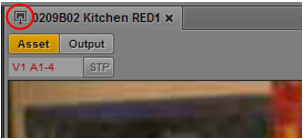
When you load a remote asset in the Media viewer, a remote-asset icon is displayed in the title bar, as shown in the following illustration.
Note the following:
• If you do not have the appropriate access permissions on the asset in the Interplay Production database, you cannot play the asset.
Access permissions are checked based on the shared user identity in the MediaCentral User Management system. A users needs to have credentials linked to an Interplay Production user for any Media Central UX systems the user accesses.
• You can play a remote asset, but you cannot add it to a sequence or create subclips. Controls such as creating subclips are disabled for remote assets.
• Starting with MediaCentral UX v2.9, you can view and edit marker text, create new markers, and delete markers if you have the proper permissions.
• You can share remote assets through links in the Messages pane. For more information, see
Sending Messages.
• Starting with MediaCentral UX V2.5, if you are signed in to a MediaCentral server that is not configured for Interplay Production, you can search for and play assets from one or more remote Interplay Production systems. Both the local and the remote systems must be configured for multi-zone and Media Index.
Deliver, Deliver to Me, and Restore from Archive are not available for this configuration because there is no local Interplay Production system.