Stepping Through Assets
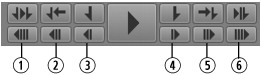
You can use various controls to step through a clip, subclip, or sequence. The following illustration shows the buttons in the Media pane that you use to step forward or back.
1 | 10 Seconds Back | 4 | 1 Frame Forward |
2 | 1 Second Back | 5 | 1 Second Forward |
3 | 1 Frame Back | 6 | 10 Seconds Forward |
For audio-only clips, stepping 1 frame is the equivalent of stepping .01second.
To step through an asset or sequence, do one of the following:

Click the 10 Seconds Back button.
Click the 1 Second Back button.
Click the 1 Frame Back button or press the left arrow key.
Click the 1 Frame Forward button or press the right arrow key.
Click the 1 Second Forward button.
Click the 10 Seconds Forward button.
Press the Home key to move to the beginning of a clip.
Press the End key to move to the end of a clip.