Getting Information on Allowed Attachments
When you create a process, the Create Process dialog box shows the number of attachments (assets and files) in the Attachments count. The same information is provided in the Tasks pane when you select a task. See
The Tasks Pane.
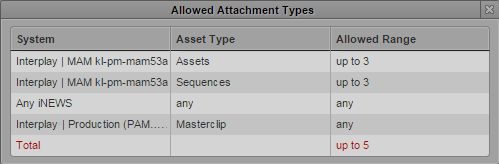
In both environments, if the number of attachments does not comply with the allowed limits, the “Attachments” count is shown in red. An Allowed Attachment Types window provides details, including the reason why the limit is exceeded.
To get information on the allowed attachments:
1. Do one of the following:

Open the Create Process dialog box.
Open the Tasks pane and select a task in the Task List.
The Attachments count shows the number of attached item and the attached items are shown as “asset cards” in the Attachments area.
2. Click the Show Details link beside the Attachments count.
The Allowed Attachments Type window provides detailed information on the number and type of allowed attachments. Each row represents a rule. Note that file attachments are not configured as separate rules, but are evaluated in the total number of allowed attachments.
- System: Type (Interplay MAM, Interplay Production, iNEWS) and name of the system to which the rule applies. If the rule applies to all systems of a type, the prefix “Any” is shown.
- Asset Types: Name of the allowed asset type or “any” if there is no restriction.
- Allowed Range: Number and range of allowed attachments (none, any, exactly n, up to n, from n-to m).
- Total: The maximum number of attachments allowed for the process.
Rules that do not comply with the allowed limits are shown in red.
Click the Close box or click anywhere outside the window to close the Allowed Attachments Types window.