The Log Layout
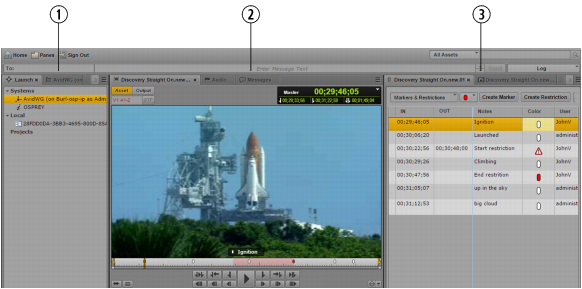
The Log layout provides you with an arrangement of panes defined for use in logging, which you can customize. The following illustration shows the Launch pane, the Media pane, and the Logging pane. The Logging pane tab displays the name of the loaded clip or sequence.
1 | Launch pane, Asset pane | 3 | Logging Pane, Thumbnails Pane, Metadata pane (not shown) |
2 | Media pane, Audio pane, Messages pane | | |
You can adjust the location and size of the panes as you can do in other layouts. For example, you can drag the Assets pane beneath the Media pane. For more information, see
Working with Areas and Panes.

The Output button and the STP button in the Media pane are disabled in the Log layout.
To open the Log layout:

Select Log from the Layout selector.
To reset the Log layout:
Select Reset Layout from the Layout selector.