Assigning the Term of a Thesaurus
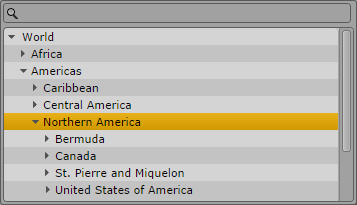
Thesauruses are mostly used to provide larger sets of invariant terms that can be assigned as values to a property. When you open a property of type thesaurus, the Tags selector window shows a search box and the name of the thesaurus.
To assign a thesaurus term:
1. Do one of the following:

Navigate the thesaurus using the Arrow keys: Press the Up Arrow or Down Arrow key to move up and down, press the Right Arrow or Left Arrow key to expand or collapse a node.
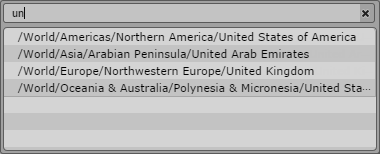
Start typing the name of the term in the search box. MediaCentral UX searches the terms starting with that letter. As you continue to type, MediaCentral UX continues to filter the list according to the letter you type. The Tags selector window additionally shows the path of the term within the thesaurus.
2. Do one of the following:
Double-click the term.
Navigate down the list using the Down Arrow key until you reach the desired term and press Enter.