Approving and Publishing Media Packages
Users logged in to MediaCentral with as an Administrator or with a Media Distribute Producer role can approve and publish packages.You can publish packages to multiple targets from the Packages pane.
To review and approve media packages:
1. Click the Panes Menu button and select Packages.
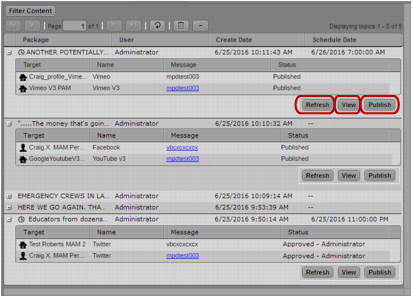
The Packages pane opens and displays all packages and their profiles.
Packages pane, listing all media packages: Refresh button; Edit/View button; Approve/Publish button
2. To approve and publish the package to an online target, do one of the following:

To publish an unscheduled package, click Publish.
To approve a scheduled package, click Approve.
The status displays as Published or, for scheduled packages, Approved. When a scheduled package is published, the status changes from Approved to Published.
If the package contains video content, the status indicates the mixdown and transcode process before publishing it to your target. Mixdown and transcode processes must complete before a scheduled package can be published.

Final approval of a package for publication usually is governed by settings and permissions in your corporate CMS.
3. If you want to cancel a package scheduled for delivery, click Recall.
The status displays as Pending and the Recall button changes to the Approve button. You can approve the package or remove it from the list of packages in the Packages pane.