Reviewing Media Packages
Before publishing a package, your Media Distribute Producer can review and edit the package to prepare it for publication.

You must have an Media Distribute Producer role to approve stories.
To view the submitted packages:
1. Click the Layout selector and select Media Distribute.
The Media Distribute layout opens.
2. Click the Panes Menu button and select Packages.
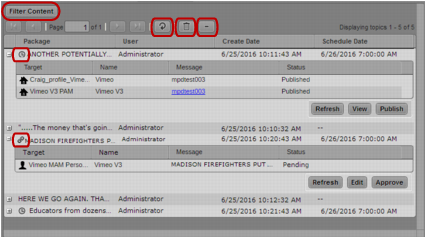
The Packages pane opens and displays all packages and their profiles.
Packages pane, listing all media packages: Filter Content button; Refresh button; Delete button; Collapse button, Scheduled delivery icon; Sync icon
3. If you want to view only a list of the packages, click the Collapse button. To expand the list, click the Expand button next to the package you want to view.
4. To refresh the list to see newly submitted packages, click the Refresh button.
5. To sort the list, click the Sort arrow at the top of each column in the Packages pane.
6. If you want to review or edit one of the packages, do the following:
a. In the item listing you want to review, click Edit.
The selected package opens in either the Social Message pane or the Web Story pane.
b. Make the changes you want, and then click Update.
The application saves your changes and opens the Packages pane.
To filter the list of messages:
1. Click Filter Content.
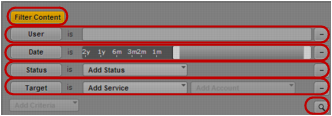
The Add Criteria menu displays.
Filter Content button with filter criteria: User and User text box; Date and Date Range slider; Status and Add Status menu; Target and Add Service menu; Search button
2. Do one of the following:
a. To filter by user name, select User, and then type in an MediaCentral user name.
b. To filter by the creation date, select Date and then adjust the Date slider to specify a range of dates.
c. To filter by the current status of the packages, select Status and then choose a status from the Add Status menu.
d. To filter by online, mobile, and social media platforms, select Target and then choose an output from the Add Target menu.
3. Click the Search button.
The Packages pane displays the filtered list of media packages.