Opening the Users Layout
The Users layout is a layout that a MediaCentral UX administrator uses to import, create, and manage users and groups.
To open the Users layout:
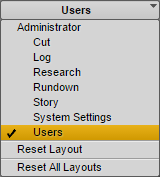
1. Sign in to MediaCentral UX as an administrator and select Users from the Layout selector.
The Layout selector shows the name of the current layout. The list shows the role for the signed-in user, along with the layouts that role can access. In the following illustration, the signed-in user is assigned the Administrator role and has seven layouts available.
Related Topics