New Features in MediaCentral | UX Version 2.7.2
This topic provides an overview of the major new features in MediaCentral UX v2.7.2.
Enabling Custom Text in the Search Field
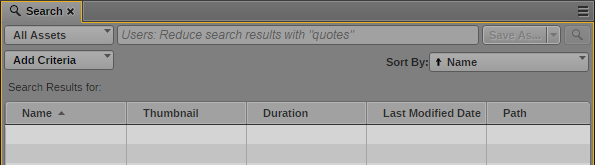
Currently, the MediaCentral UX Search field displays an empty text box where users enter search criteria. By adding a string to the application.properties file, Administrators can enter a custom message which appears in the search field as light gray text. In the following example, “Users: Reduce search results with “quotes”” has been added to the application.properties file:
When a user begins to enter text in the search field, the example text is replaced by the user’s search criteria.
To enable a custom message in the search box, enter the following string to the application.properties file:
system.client.search.indexed.placeholder=<value>
<value> represents a custom message.
For more information on editing the application.properties file, see “Modifying application.properties” in the Avid MediaCentral Platform Services Installation and Configuration Guide.
Disabling Background Thumbnail Generation
If the Thumbnails pane is open, MediaCentral UX continues to populate the pane with images if the pane is in the background (open but hidden behind another pane).
To optimize performance, you can disable generation of thumbnails if the pane is in the background.
To disable background thumbnail generation:
1. Log into MediaCentral UX.
2. Select Home > User Settings.
3. In the list of Settings Groups, click Thumbnails.
By default, the option “Generate thumbnails in the background” is selected. To disable background thumbnail generation, deselect the option.
4. Click Apply.