Working with Deep Links
MediaCentral UX users often exchange text messages between themselves through the Messages pane in the MediaCentral UX (browser) or through the built-in functionality of the MediaCentral app for iOS. When creating a message, users have the ability to attach Interplay Production assets or Interplay MAM folders and assets if desired. If E-mail Forwarding is enabled in the MediaCentral UX System Settings, offline users receive an e-mail with the text and a link to the asset included in the original message. These links are referred to as “deep links”.
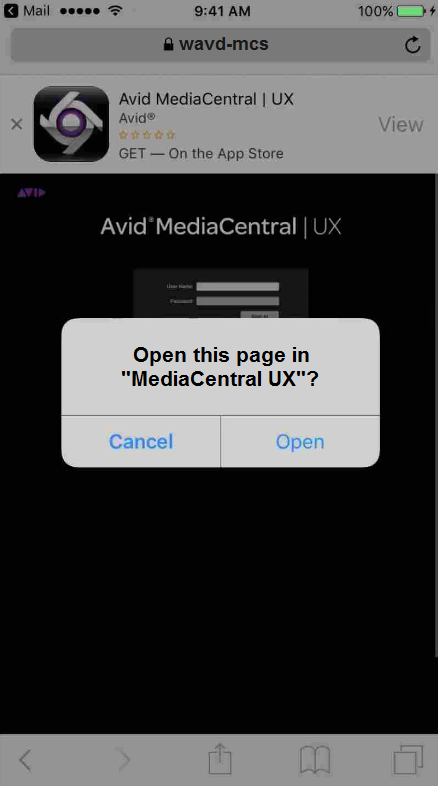
Version 2.10.1 of the MediaCentral UX mobile app for iOS enables users to more easily access these deep links. When tapping on a link in an e-mail from a forwarded message, the Safari browser opens on the mobile device and a tab for MediaCentral UX appears. MediaCentral detects the mobile device and displays a pop-up window; asking the user if they would like to open the link in the MediaCentral mobile app.
If the user selects Open, the MediaCentral UX app appears and requests that the user logs in. Once logged in, the user is directed to the linked asset. If the user selects Cancel, the pop-up window is closed and the MediaCentral UX tab in Safari remains.
If the MediaCentral UX mobile app is not installed, a banner at the top of the screen provides a quick link to download and install the app.

The deep link feature for iOS requires a certificate containing the FQDN of the MediaCentral server to be added to mobile device’s Safari browser. If your site has not obtained a certificate from a Trusted Authority, you must create and import a self-signed certificate on the mobile device. For more information, see the following article on the Avid Knowledge Base: