Working with Remote Playback (Interplay | MAM)
If you are working in a multi-zone MediaCentral environment, a MediaCentral server can be configured to allow playback of Interplay MAM assets whose essences (media) are stored on a remote location. For information about enabling remote Interplay MAM playback, see the MediaCentral Platform Services Installation and Configuration Guide.
You can use this remote media to create an Interplay MAM sequence. Remote media can be mixed with local media in the same timeline. Starting with MediaCentral UX v2.7, the Sequence pane and the Media pane include visual indicators that you are working with remote media.
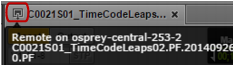
If you load an asset with remote media, a remote asset icon is displayed on the Media pane’s tab. If you hover the mouse over the tab, the name of the remote MediaCentral UX server (the server that is playing back the remote media) is displayed. The full name of the asset is also displayed. In the following illustration, the name of the remote MediaCentral server is “osprey-central-253-2.”
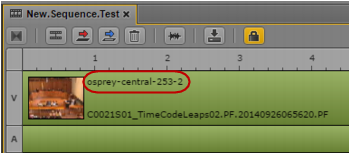
If you add an asset with remote media to a sequence, the name of the remote MediaCentral server is displayed on the clip, along with the clip name.