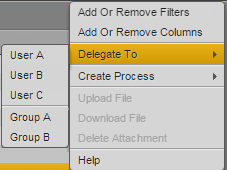
Delegating User Tasks
You can delegate user tasks to another user or user group. This means that you can delegate an action that has to be performed during the process execution to another user or group. Delegating changes the access to the task. Your ability to delegate a task depends on rules: the process configuration must allow the delegation of the selected task.
To delegate tasks:
1. Select one or several tasks in the Task List.
2. Click the Pane Menu button.
3. Select Delegate To.
The list shows all users and groups to which the selected tasks can be delegated. If delegation is not restricted to individual users, “Any user” is shown in the list.
4. Select the user or group to which you want to delegate the task.
After the delegation is successfully completed for at least one task, the Task List is refreshed. In most cases, delegated tasks are removed from the Task List. However, if you delegate a task to a group and you are member of that group, the task will not be removed from the Task List.