Working with Multiple Caption Blocks
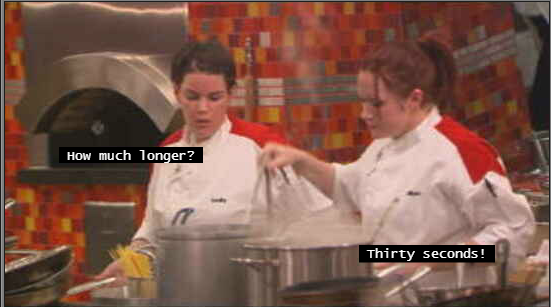
If two or more closed caption segments share a simultaneous time span, all captions are displayed in the Media viewer. For example, in a scene with two speakers, you can align one caption left and one caption right, as shown in the following illustration.
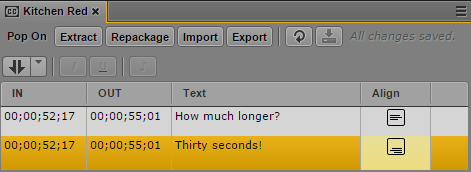
Text for each caption is entered on a separate segment in the Closed Captioning pane, with the desired alignment set in the Align column. The following example shows the Closed Captioning pane for the above illustration:
Note the following:
• If multiple captions share the same line (top, middle, or bottom), they will be merged into a single line as part of the repackaging or export process. To avoid this, change the alignment so each caption is on a different line.
• If multiple captions share the same line (top, middle, or bottom), the total number of characters per line is limited to 32.
• All segments must share the same In point and Out point. You cannot currently edit the In point and Out point of simultaneous segments after you have set them once.
• Multiple caption blocks are limited to a total of four rows. Additional rows are not displayed.”O