Defining Merge Rules for Annotated Segments
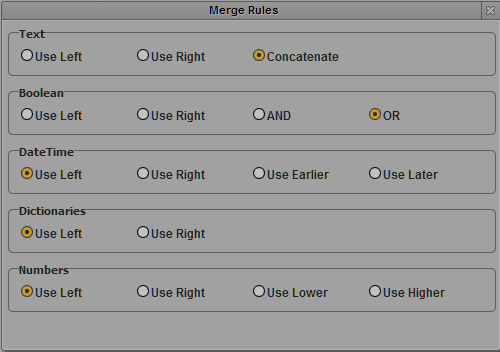
The Logging pane provides rules to deal with annotation when you merge annotated segments. These rules apply to the properties provided in a Merge Rules dialog box.
The Use Left and Use Right rules are the same for all property types:
• When you select Use Left, the annotation of the left segment is assigned to the merged segment.
• When you select Use Right, the annotation of the right segment is assigned to the merged segment.
You can also apply property type specific rules:
Property type | Rule | Result |
Text | Concatenate | The annotation of both segments is assigned to the merged segment. |
Boolean | AND | “True” is only assigned to the merged segment if it was set in both original segments. |
| OR | “True” is assigned to the merged segment if it was set in one of the original segments. |
DateTime | Use Earlier Use Later | The earlier/later date is assigned to the merged segment. Is also applied to Timecode properties. |
Numbers | User Lower User Higher | The lower/higher number is assigned to the merged segment. |
To define merge rules:
1. Click the Pane menu and select Merge Rules.
The Merge Rules dialog box opens.
2. Select the merge rule for each property type you want to change.
3. Click outside the dialog box or click the X button to close the Merge Rules dialog box.
The merge rules are saved in your user settings and are automatically applied when you merge annotated segments. For more information on how to merge segments, see
Merging Segments.