Panning for Advanced Sequences
MediaCentral UX uses panning for advanced sequences as it is set in the Interplay Administrator.
• NAT and SOT tracks: Mapped as odd tracks=left, even tracks=right. Source tracks for output are patched in the “Audio - Storyline Audio Patching” setting on the Editing Settings tab of the Application Database Settings.
• VO track: Mapped as odd tracks=left, even tracks=right. You can center the VO track by selecting “Center-Panned Sound on Tape and VO” on the Editing Settings tab of the Application Database Settings.
These settings are saved in the sequence and are used for mixdown and send-to-playback (STP).
If Mix Mode is set for Mono, panning is ignored and all tracks are mixed into a single track for monitoring, which is played back in both output monitors (left and right). This setting is not saved with the sequence. Panning as set in the Interplay Administrator is used for mixdown and send-to-playback.
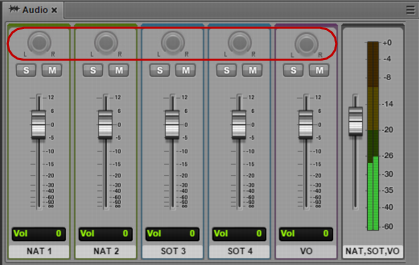
In the current release, the panning buttons are inactive, as shown in the following illustration.

For a procedure to override these defaults by using the application.properties file, see the
MediaCentral Platform Services Installation and Configuration Guide. This override is global and applies to all Interplay folders.
Complex (uneditable) sequences created in Media Composer use panning as set in Media Composer.