The Navigation Drawer and Directory Panel
After you sign in to MediaCentral on your Android device, you can view the navigation drawer, located along the left side of the screen when displayed. From the navigation drawer, you can connect to various systems integrated with MediaCentral, such as iNEWS newsroom computer systems or an Interplay Production database. The navigation drawer also includes any iNEWS servers that are part of an iNEWS community.
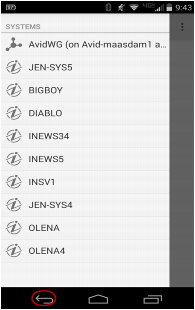
The following illustration shows the navigation drawer.
The navigation drawer with the Android Back button
From the navigation drawer, you can open the Directory panel to navigate through the directory structure and open assets. After opening assets, you can view the navigation drawer at any time by swiping your finger across the screen to the right or by tapping the Up button.