Using the Messages Pane
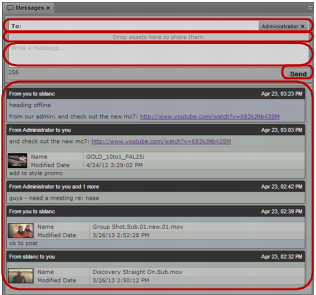
The Messages pane displays a message box for sending both text messages and media asset links. It also lists all received messages, with the most recent messages at the top of the list.
Messages sent by you display in the message list with a blue background, while messages received by you display with a green background.
Messages pane (top to bottom): address text box, asset area, message text box, Send button, message list
To display the Messages pane and read messages, do the following:

Select Panes > Messages.
The Messages pane opens in the mode and orientation in which it was set when you signed out of the application. A notification bar above the list appears if you have any new messages.
Messages pane, with the notification bar indicating one new message