Send-to-Playback Profile Examples
The following examples of send-to-playback profiles show settings for different resolutions and different playback servers.
Selecting a Transfer Server
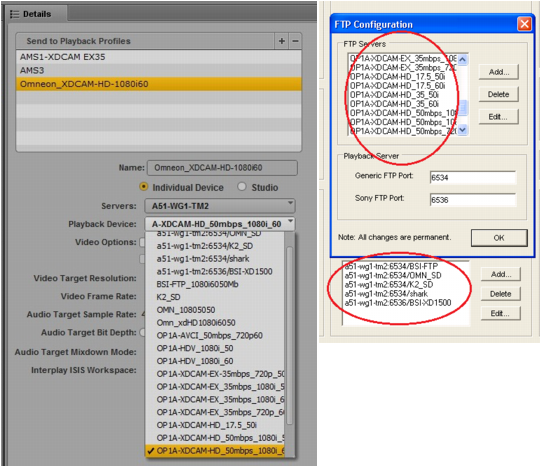
When you select a server in an STP profile, the Servers list includes all Interplay Transfer Engines and AirSpeed Transfer Engines that are specified in the Interplay Production workgroup. The following illustration shows the Servers list and the corresponding Interplay Transfer Settings in the Interplay Administrator.
Individual AirSpeed servers in a studio are listed because the option “Show individual studio hosts in Send to Playback choices” is selected in the Interplay Transfer Settings in the Interplay | Administrator.
Selecting a Playback Device
When you select a playback device in an STP profile, the Playback Device list includes the playback devices that are associated with the Interplay Transfer server you selected.
• For AirSpeed Classic servers, there is only one selection that matches the server name.
• For AirSpeed Multi Stream and AirSpeed 5000/5500 servers, there can be two types of selections:
- One selection that matches the server name. Select this playback device for all resolutions except for Long GOP media.
- One selection that adds -HD to the server name. The -HD suffix indicates that the AirSpeed Multi Stream server is equipped with an HD board. Select this playback device for Long GOP media (for example, XDCAM-HD or AVC-LongG).
• For Transfer Engine servers, the list includes all devices that have been configured for the selected Transfer Engine server. The following illustration shows the Playback Device list for a Transfer Engine server and the corresponding list in the Transfer Engine Configuration window.
XDCAM-HD on AirSpeed Multi Stream or AirSpeed 5000/5500
This profile, named AMS1-XDCAM1080i60_50mb, specifies settings for an AirSpeed Multi Stream server that supports Long GOP media. This profile also applies to AirSpeed 5000/5500 servers.
Note the following:
• Servers: Airspeed includes a Transfer Engine, so A51-WG1-AMS1 is the computer name for the AMS server.
• Playback Device: Because this profile supports XDCAM-HD Long GOP media, the playback device name includes the -HD suffix.
• Long GOP and AirSpeed must be selected for this profile. With these options selected Accelerated STP (Send to Playback) becomes available, and can be used in this case because the AirSpeed Multi Stream server is version 1.7 or later. The option is available for all AirSpeed 5000/5500 servers.
• The remaining media options specifically describe the target video and audio resolutions. The Mixdown Mode is set for Stereo, and the specified ISIS or NEXIS workspace will hold the mixed-down media.
XDCAM-HD on AirSpeed Multi Stream or AirSpeed 5000/5500 Studio
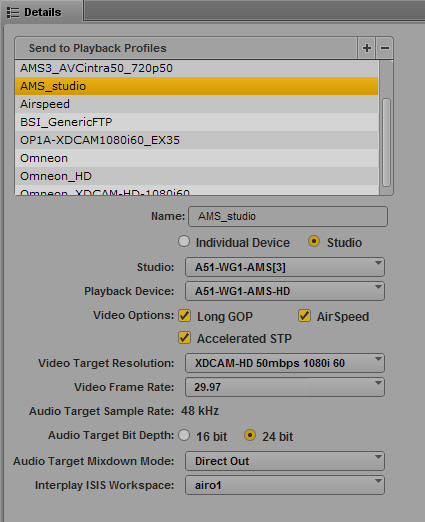
The following profile, named AMS_studio, is similar to the previous profile but is configured for an AirSpeed Multi Stream studio. This profile also applies to an AirSpeed 5000/5500 studio
Note the following:
• Studio: The Studio option is selected and the Servers list is replaced by the Studio list. A51-WG1-AMS[3] is the computer name for the AirSpeed Multi Stream Studio group.
• Playback Device: Because this profile supports XDCAM-HD Long GOP media, the playback device name includes the -HD suffix.
• Long GOP and AirSpeed must be selected for this profile. With these options selected Accelerated STP (Send to Playback) becomes available, and can be used in this case because the AirSpeed Multi Stream server is version 1.7 or later. The option is available for all AirSpeed 5000/5500 servers.
• The remaining media options specifically describe the target video and audio resolutions. The Mixdown Mode is set for Direct Out, and the specified ISIS or NEXIS workspace will hold the mixed-down media.
SD or DNxHD on AirSpeed
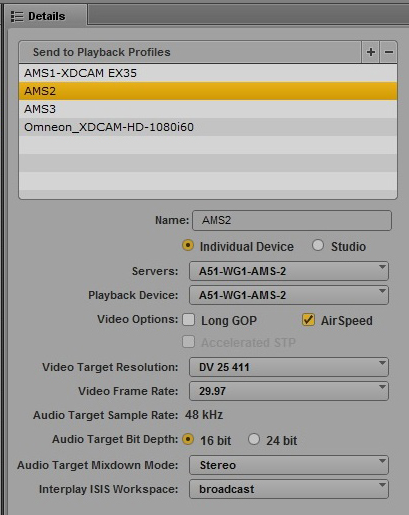
The following profile, named AMS2, specifies settings for an AirSpeed Multi Stream server that supports DV 25 SD media. This profile also applies to AirSpeed Classic and AirSpeed 5000/5500 servers.
Note the following:
• Servers: A51-WG1-AMS2 is the computer name for this AirSpeed Multi Stream server.
• Playback Device: Because this profile supports SD media, the playback device name matches the server name and does not include the -HD suffix.
• AirSpeed must be selected for this profile.
• The remaining media options specifically describe the target video and audio resolutions. The Mixdown Mode is set for Stereo, and the specified ISIS or NEXIS workspace will hold the mixed-down media.
Generic FTP Profile
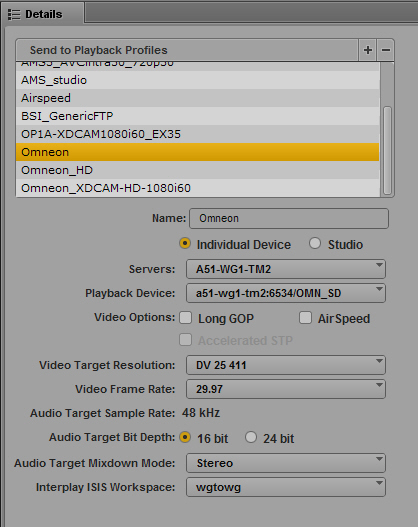
The following profile, named Omneon, specifies settings for a third-party server configured for Generic FTP settings through a Transfer Engine server.
Note the following:
• Servers: A51-WG1-TM2 is the computer name for the Transfer Engine server.
• Playback Device: a51-wg1-tm2:6534/OMN_SD is the third-party server configured through the Transfer Engine.
• The remaining media options specifically describe the target video and audio resolutions. The Mixdown Mode is set for Stereo, and the specified ISIS or NEXIS workspace will hold the mixed-down media.